
Linux中国
14 个 grep 命令的例子

在本文中,我们将会讨论到14个grep命令的例子。
例1 在文件中查找模式(单词)
在/etc/passwd文件中查找单词“linuxtechi”
root@Linux-world:~# grep linuxtechi /etc/passwd
linuxtechi:x:1000:1000:linuxtechi,,,:/home/linuxtechi:/bin/bash
root@Linux-world:~#
例2 在多个文件中查找模式。
root@Linux-world:~# grep linuxtechi /etc/passwd /etc/shadow /etc/gshadow
/etc/passwd:linuxtechi:x:1000:1000:linuxtechi,,,:/home/linuxtechi:/bin/bash
/etc/shadow:linuxtechi:$6$DdgXjxlM$4flz4JRvefvKp0DG6re:16550:0:99999:7:::/etc/gshadow:adm:*::syslog,linuxtechi
/etc/gshadow:cdrom:*::linuxtechi
/etc/gshadow:sudo:*::linuxtechi
/etc/gshadow:dip:*::linuxtechi
/etc/gshadow:plugdev:*::linuxtechi
/etc/gshadow:lpadmin:!::linuxtechi
/etc/gshadow:linuxtechi:!::
/etc/gshadow:sambashare:!::linuxtechi
root@Linux-world:~#
例3 使用-l参数列出包含指定模式的文件的文件名。
root@Linux-world:~# grep -l linuxtechi /etc/passwd /etc/shadow /etc/fstab /etc/mtab
/etc/passwd
/etc/shadow
root@Linux-world:~#
例4 使用-n参数,在文件中查找指定模式并显示匹配行的行号
root@Linux-world:~# grep -n linuxtechi /etc/passwd
39:linuxtechi:x:1000:1000:linuxtechi,,,:/home/linuxtechi:/bin/bash
root@Linux-world:~#
root@Linux-world:~# grep -n root /etc/passwd /etc/shadow
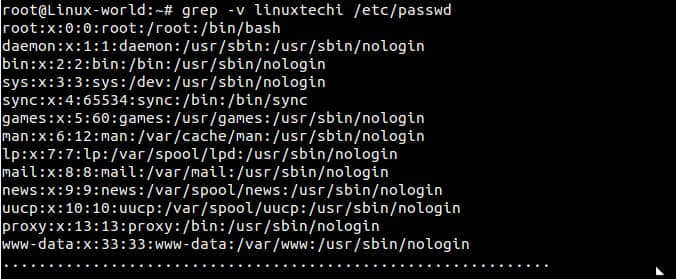
例5 使用-v参数输出不包含指定模式的行
输出/etc/passwd文件中所有不含单词“linuxtechi”的行
root@Linux-world:~# grep -v linuxtechi /etc/passwd
例6 使用 ^ 符号输出所有以某指定模式开头的行
Bash脚本将 ^ 符号视作特殊字符,用于指定一行或者一个单词的开始。例如输出/etc/passes文件中所有以“root”开头的行
root@Linux-world:~# grep ^root /etc/passwd
root:x:0:0:root:/root:/bin/bash
root@Linux-world:~#
例7 使用 $ 符号输出所有以指定模式结尾的行。
输出/etc/passwd文件中所有以“bash”结尾的行。
root@Linux-world:~# grep bash$ /etc/passwd
root:x:0:0:root:/root:/bin/bash
linuxtechi:x:1000:1000:linuxtechi,,,:/home/linuxtechi:/bin/bash
root@Linux-world:~#
Bash脚本将美元($)符号视作特殊字符,用于指定一行或者一个单词的结尾。
例8 使用 -r 参数递归地查找特定模式
root@Linux-world:~# grep -r linuxtechi /etc/
/etc/subuid:linuxtechi:100000:65536
/etc/group:adm:x:4:syslog,linuxtechi
/etc/group:cdrom:x:24:linuxtechi
/etc/group:sudo:x:27:linuxtechi
/etc/group:dip:x:30:linuxtechi
/etc/group:plugdev:x:46:linuxtechi
/etc/group:lpadmin:x:115:linuxtechi
/etc/group:linuxtechi:x:1000:
/etc/group:sambashare:x:131:linuxtechi
/etc/passwd-:linuxtechi:x:1000:1000:linuxtechi,,,:/home/linuxtechi:/bin/bash
/etc/passwd:linuxtechi:x:1000:1000:linuxtechi,,,:/home/linuxtechi:/bin/bash
............................................................................
上面的命令将会递归的在/etc目录中查找“linuxtechi”单词
例9 使用 grep 查找文件中所有的空行
root@Linux-world:~# grep ^$ /etc/shadow
root@Linux-world:~#
由于/etc/shadow文件中没有空行,所以没有任何输出
例10 使用 -i 参数查找模式
grep命令的-i参数在查找时忽略字符的大小写。
我们来看一个例子,在paswd文件中查找“LinuxTechi”单词。
nextstep4it@localhost:~$ grep -i LinuxTechi /etc/passwd
linuxtechi:x:1001:1001::/home/linuxtechi:/bin/bash
nextstep4it@localhost:~$
例11 使用 -e 参数查找多个模式
例如,我想在一条grep命令中查找‘linuxtechi’和‘root’单词,使用-e参数,我们可以查找多个模式。
root@Linux-world:~# grep -e "linuxtechi" -e "root" /etc/passwd
root:x:0:0:root:/root:/bin/bash
linuxtechi:x:1000:1000:linuxtechi,,,:/home/linuxtechi:/bin/bash
root@Linux-world:~#
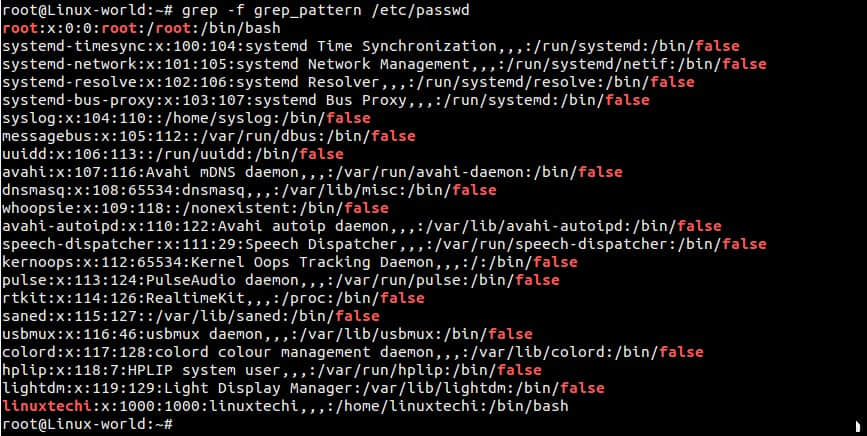
例12 使用 -f 用文件指定待查找的模式
首先,在当前目录中创建一个搜索模式文件“grep_pattern”,我想文件中输入的如下内容。
root@Linux-world:~# cat grep_pattern
^linuxtechi
root
false$
root@Linux-world:~#
现在,试试使用grep_pattern文件进行搜索
root@Linux-world:~# grep -f grep_pattern /etc/passwd
例13 使用 -c 参数计算模式匹配到的数量
继续上面例子,我们在grep命令中使用-c命令计算匹配指定模式的数量
root@Linux-world:~# grep -c -f grep_pattern /etc/passwd
22
root@Linux-world:~#
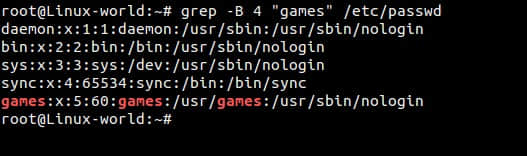
例14 输出匹配指定模式行的前或者后面N行
a)使用-B参数输出匹配行的前4行
root@Linux-world:~# grep -B 4 "games" /etc/passwd
b)使用-A参数输出匹配行的后4行
root@Linux-world:~# grep -A 4 "games" /etc/passwd
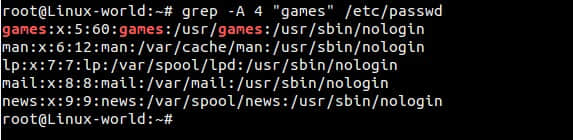
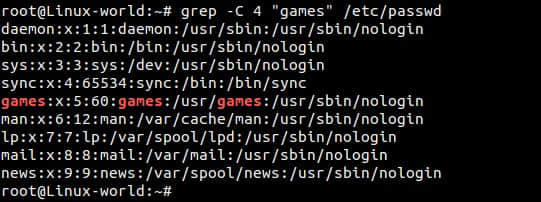
c)使用-C参数输出匹配行的前后各4行
root@Linux-world:~# grep -C 4 "games" /etc/passwd
via: http://www.linuxtechi.com/linux-grep-command-with-14-different-examples/
作者:Pradeep Kumar 译者:cvsher 校对:wxy
本文转载来自 Linux 中国: https://github.com/Linux-CN/archive
对这篇文章感觉如何?
太棒了
0
不错
0
爱死了
0
不太好
0
感觉很糟
0
You may also like





More in:Linux中国

捐赠 Let's Encrypt,共建安全的互联网
随着 Mozilla、苹果和谷歌对沃通和 StartCom 这两家 CA 公司处罚落定,很多使用这两家 CA 所签发证书的网站纷纷寻求新的证书签发商。有一个非盈利组织可以为大家提供了免费、可靠和安全的 SSL 证书服务,这就是 Let's Encrypt 项目。现在,它需要您的帮助
Let's Encrypt 正式发布,已经保护 380 万个域名
由于 Let's Encrypt 让安装 X.509 TLS 证书变得非常简单,所以这个数量增长迅猛。

关于Linux防火墙iptables的面试问答
Nishita Agarwal是Tecmint的用户,她将分享关于她刚刚经历的一家公司(印度的一家私人公司Pune)的面试经验。在面试中她被问及许多不同的问题,但她是iptables方面的专家,因此她想分享这些关于iptables的问题和相应的答案给那些以后可能会进行相关面试的人。 所有的问题和相应的答案都基于Nishita Agarwal的记忆并经过了重写。 嗨,朋友!我叫Nishita Agarwal。我已经取得了理学学士学位,我的专业集中在UNIX和它的变种(BSD,Linux)。它们一直深深的吸引着我。我在存储方面有1年多的经验。我正在寻求职业上的变化,并将供职于印度的P
Lets Encrypt 已被所有主流浏览器所信任
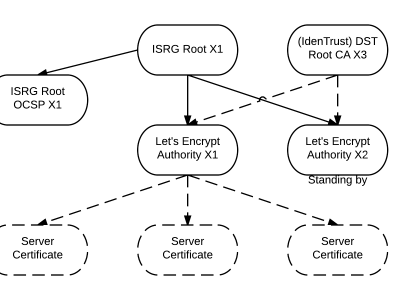
旨在让每个网站都能使用 HTTPS 加密的非赢利组织 Lets Encrypt 已经得了 IdenTrust的交叉签名,这意味着其证书现在已经可以被所有主流的浏览器所信任。从这个里程碑事件开始,访问者访问使用了Lets Encrypt 证书的网站不再需要特别配置就可以得到 HTTPS 安全保护了。 Lets Encrypt 的两个中级证书 ...
关注 LinuxStory 微信公众号,获取最新的 Linux 和操作系统资讯,每天为您带来热腾腾的开源新闻与新鲜温暖的科技故事。