
在 CentOS/RHEL 系统上生成补丁合规报告的 Bash 脚本

如果你运行的是大型 Linux 环境,那么你可能已经将 Red Hat 与 Satellite 集成了。如果是的话,你不必担心补丁合规性报告,因为有一种方法可以从 Satellite 服务器导出它。
但是,如果你运行的是没有 Satellite 集成的小型 Red Hat 环境,或者它是 CentOS 系统,那么此脚本将帮助你创建该报告。
补丁合规性报告通常每月创建一次或三个月一次,具体取决于公司的需求。根据你的需要添加 cronjob 来自动执行此功能。
此 bash 脚本 通常适合于少于 50 个系统运行,但没有限制。
保持系统最新是 Linux 管理员的一项重要任务,它使你的计算机非常稳定和安全。
以下文章可以帮助你了解有关在红帽 (RHEL) 和 CentOS 系统上安装安全修补程序的更多详细信息。
此教程中包含四个 shell 脚本,请选择适合你的脚本。
方法 1:为 CentOS / RHEL 系统上的安全修补生成补丁合规性报告的 Bash 脚本
此脚本只会生成安全修补合规性报告。它会通过纯文本发送邮件。
# vi /opt/scripts/small-scripts/sec-errata.sh

#!/bin/sh
/tmp/sec-up.txt
SUBJECT="Patching Reports on "date""
MESSAGE="/tmp/sec-up.txt"
TO="[email protected]"
echo "+---------------+-----------------------------+" >> $MESSAGE
echo "| Server_Name   |  Security Errata            |" >> $MESSAGE
echo "+---------------+-----------------------------+" >> $MESSAGE
for server in `more /opt/scripts/server.txt`
do
sec=`ssh $server yum updateinfo summary | grep 'Security' | grep -v 'Important|Moderate' | tail -1 | awk '{print $1}'`
echo "$server                $sec" >> $MESSAGE
done
echo "+---------------------------------------------+" >> $MESSAGE
mail -s "$SUBJECT" "$TO" < $MESSAGE
添加完上面的脚本后运行它。
# sh /opt/scripts/small-scripts/sec-errata.sh你会看到下面的输出。
# cat /tmp/sec-up.txt

+---------------+-------------------+
| Server_Name   |  Security Errata  |
+---------------+-------------------+
server1
server2
server3                21
server4
+-----------------------------------+
添加下面的 cronjob 来每个月得到一份补丁合规性报告。
# crontab -e

@monthly /bin/bash /opt/scripts/system-uptime-script-1.sh
方法 1a:为 CentOS / RHEL 系统上的安全修补生成补丁合规性报告的 Bash 脚本
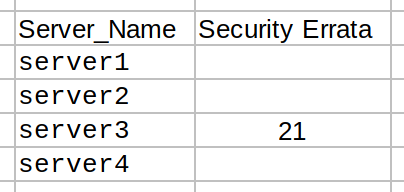
脚本会为你生成安全修补合规性报告。它会通过 CSV 文件发送邮件。
# vi /opt/scripts/small-scripts/sec-errata-1.sh

#!/bin/sh
echo "Server Name, Security Errata" > /tmp/sec-up.csv
for server in `more /opt/scripts/server.txt`
do
sec=`ssh $server yum updateinfo summary | grep 'Security' | grep -v 'Important|Moderate' | tail -1 | awk '{print $1}'`
echo "$server,  $sec" >> /tmp/sec-up.csv
done
echo "Patching Report for `date +"%B %Y"`" | mailx -s "Patching Report on `date`" -a /tmp/sec-up.csv [email protected]
rm /tmp/sec-up.csv
添加完上面的脚本后运行它。
# sh /opt/scripts/small-scripts/sec-errata-1.sh你会看到下面的输出。
方法 2:为 CentOS / RHEL 系统上的安全修补、bugfix、增强生成补丁合规性报告的 Bash 脚本
脚本会为你生成安全修补、bugfix、增强的补丁合规性报告。它会通过纯文本发送邮件。
# vi /opt/scripts/small-scripts/sec-errata-bugfix-enhancement.sh

#!/bin/sh
/tmp/sec-up.txt
SUBJECT="Patching Reports on "`date`""
MESSAGE="/tmp/sec-up.txt"
TO="[email protected]"
echo "+---------------+-------------------+--------+---------------------+" >> $MESSAGE
echo "| Server_Name   |  Security Errata  | Bugfix |  Enhancement        |" >> $MESSAGE
echo "+---------------+-------------------+--------+---------------------+" >> $MESSAGE
for server in `more /opt/scripts/server.txt`
do
sec=`ssh $server yum updateinfo summary | grep 'Security' | grep -v 'Important|Moderate' | tail -1 | awk '{print $1}'`
bug=`ssh $server yum updateinfo summary | grep 'Bugfix' | tail -1 | awk '{print $1}'`
enhance=`ssh $server yum updateinfo summary | grep 'Enhancement' | tail -1 | awk '{print $1}'`
echo "$server                $sec               $bug             $enhance" >> $MESSAGE
done
echo "+------------------------------------------------------------------+" >> $MESSAGE
mail -s "$SUBJECT" "$TO" < $MESSAGE
添加完上面的脚本后运行它。
# sh /opt/scripts/small-scripts/sec-errata-bugfix-enhancement.sh你会看到下面的输出。
# cat /tmp/sec-up.txt

+---------------+-------------------+--------+---------------------+
| Server_Name   |  Security Errata  | Bugfix |  Enhancement        |
+---------------+-------------------+--------+---------------------+
server01                                16
server02                  5             16
server03                  21           266             20
server04                                16
+------------------------------------------------------------------+
添加下面的 cronjob 来每三个月得到补丁合规性报告。该脚本计划在一月、四月、七月、十月的 1 号运行。
# crontab -e

0 0 01 */3 * /bin/bash /opt/scripts/system-uptime-script-1.sh
方法 2a:为 CentOS / RHEL 系统上的安全修补、bugfix、增强生成补丁合规性报告的 Bash 脚本
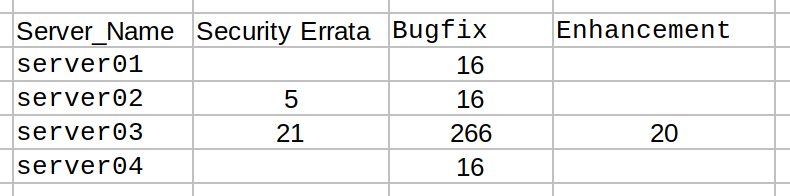
脚本会为你生成安全修补、bugfix、增强的补丁合规性报告。它会通过 CSV 文件发送邮件。
# vi /opt/scripts/small-scripts/sec-errata-bugfix-enhancement-1.sh

#!/bin/sh
echo "Server Name, Security Errata,Bugfix,Enhancement" > /tmp/sec-up.csv
for server in `more /opt/scripts/server.txt`
do
sec=`ssh $server yum updateinfo summary | grep 'Security' | grep -v 'Important|Moderate' | tail -1 | awk '{print $1}'`
bug=`ssh $server yum updateinfo summary | grep 'Bugfix' | tail -1 | awk '{print $1}'`
enhance=`ssh $server yum updateinfo summary | grep 'Enhancement' | tail -1 | awk '{print $1}'`
echo "$server,$sec,$bug,$enhance" >> /tmp/sec-up.csv
done
echo "Patching Report for `date +"%B %Y"`" | mailx -s "Patching Report on `date`" -a /tmp/sec-up.csv [email protected]
rm /tmp/sec-up.csv
添加完上面的脚本后运行它。
# sh /opt/scripts/small-scripts/sec-errata-bugfix-enhancement-1.sh你会看到下面的输出。
via: https://www.2daygeek.com/bash-script-to-generate-patching-compliance-report-on-centos-rhel-systems/
作者:Magesh Maruthamuthu 选题:lujun9972 译者:geekpi 校对:校对者ID
本文转载来自 Linux 中国: https://github.com/Linux-CN/archive
对这篇文章感觉如何?
You may also like




More in:Linux中国

捐赠 Let's Encrypt,共建安全的互联网
Let's Encrypt 正式发布,已经保护 380 万个域名

关于Linux防火墙iptables的面试问答
Lets Encrypt 已被所有主流浏览器所信任