
让我们使用 PC 键盘在终端演奏钢琴

厌倦了工作?那么来吧,让我们弹弹钢琴!是的,你没有看错,根本不需要真的钢琴。我们可以用 PC 键盘在命令行下就能弹钢琴。向你们介绍一下 piano-rs —— 这是一款用 Rust 语言编写的,可以让你用 PC 键盘在终端弹钢琴的简单工具。它自由开源,基于 MIT 协议。你可以在任何支持 Rust 的操作系统中使用它。
piano-rs:使用 PC 键盘在终端弹钢琴
安装
确保系统已经安装了 Rust 编程语言。若还未安装,运行下面命令来安装它。
curl https://sh.rustup.rs -sSf | sh
(LCTT 译注:这种直接通过 curl 执行远程 shell 脚本是一种非常危险和不成熟的做法。)
安装程序会问你是否默认安装还是自定义安装还是取消安装。我希望默认安装,因此输入 1 (数字一)。
info: downloading installer

Welcome to Rust!

This will download and install the official compiler for the Rust programming
language, and its package manager, Cargo.

It will add the cargo, rustc, rustup and other commands to Cargo's bin
directory, located at:

/home/sk/.cargo/bin

This path will then be added to your PATH environment variable by modifying the
profile files located at:

/home/sk/.profile
/home/sk/.bash_profile

You can uninstall at any time with rustup self uninstall and these changes will
be reverted.

Current installation options:

default host triple: x86_64-unknown-linux-gnu
 default toolchain: stable
 modify PATH variable: yes

1) Proceed with installation (default)
2) Customize installation
3) Cancel installation
1

info: syncing channel updates for 'stable-x86_64-unknown-linux-gnu'
223.6 KiB / 223.6 KiB (100 %) 215.1 KiB/s ETA: 0 s
info: latest update on 2017-10-12, rust version 1.21.0 (3b72af97e 2017-10-09)
info: downloading component 'rustc'
 38.5 MiB / 38.5 MiB (100 %) 459.3 KiB/s ETA: 0 s
info: downloading component 'rust-std'
 56.7 MiB / 56.7 MiB (100 %) 220.6 KiB/s ETA: 0 s
info: downloading component 'cargo'
 3.7 MiB / 3.7 MiB (100 %) 173.5 KiB/s ETA: 0 s
info: downloading component 'rust-docs'
 4.1 MiB / 4.1 MiB (100 %) 224.0 KiB/s ETA: 0 s
info: installing component 'rustc'
info: installing component 'rust-std'
info: installing component 'cargo'
info: installing component 'rust-docs'
info: default toolchain set to 'stable'

stable installed - rustc 1.21.0 (3b72af97e 2017-10-09)

Rust is installed now. Great!

To get started you need Cargo's bin directory ($HOME/.cargo/bin) in your PATH
environment variable. Next time you log in this will be done automatically.

To configure your current shell run source $HOME/.cargo/env
登出然后重启系统来将 cargo 的 bin 目录纳入 PATH 变量中。
校验 Rust 是否正确安装:
$ rustc --version
rustc 1.21.0 (3b72af97e 2017-10-09)
太棒了!Rust 成功安装了。是时候构建 piano-rs 应用了。
使用下面命令克隆 Piano-rs 仓库:
git clone https://github.com/ritiek/piano-rs
上面命令会在当前工作目录创建一个名为 piano-rs 的目录并下载所有内容到其中。进入该目录:
cd piano-rs
最后,运行下面命令来构建 Piano-rs:
cargo build --release
编译过程要花上一阵子。
用法
编译完成后,在 piano-rs 目录中运行下面命令:
./target/release/piano-rs
这就是我们在终端上的钢琴键盘了!可以开始弹指一些音符了。按下按键可以弹奏相应音符。使用 左/右 方向键可以在弹奏时调整音频。而,使用 上/下 方向键可以在弹奏时调整音长。
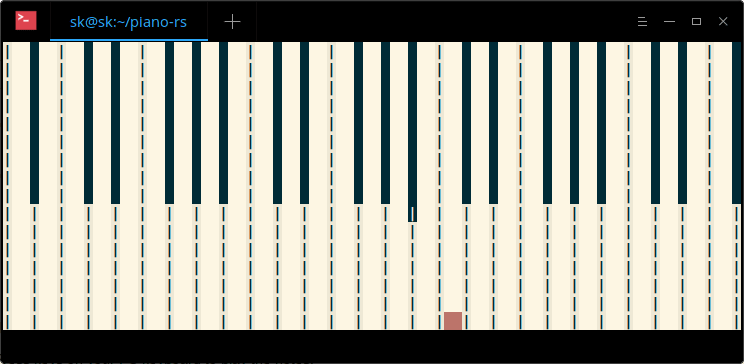
Piano-rs 使用与 multiplayerpiano.com 一样的音符和按键。另外,你可以使用这些音符来学习弹指各种流行歌曲。
要查看帮助。输入:
$ ./target/release/piano-rs -h

piano-rs 0.1.0
Ritiek Malhotra <ritiekmalhotra123@gmail.com>
Play piano in the terminal using PC keyboard.

USAGE:
 piano-rs [OPTIONS]

FLAGS:
 -h, --help Prints help information
 -V, --version Prints version information

OPTIONS:
 -c, --color <COLOR> Color of block to generate when a note is played (Default: "red")
 -d, --duration <DURATION> Duration to play each note for, where 0 means till the end of note (Default: 0)
 -s, --sequence <SEQUENCE> Frequency sequence from 0 to 5 to begin with (Default: 2)
我必须承认这是个超级酷的项目。对于那些买不起钢琴的人,很推荐使用这款应用。
祝你周末愉快!!
此致敬礼!
via: https://www.ostechnix.com/let-us-play-piano-terminal-using-pc-keyboard/
本文转载来自 Linux 中国: https://github.com/Linux-CN/archive
对这篇文章感觉如何?
You may also like




More in:Linux中国

捐赠 Let's Encrypt,共建安全的互联网
Let's Encrypt 正式发布,已经保护 380 万个域名

关于Linux防火墙iptables的面试问答
Lets Encrypt 已被所有主流浏览器所信任